Why make this? Data dictionaries (referred to as “dictionaries” from here) are often developed outside of a computing session and stored as a static file. Dictionaries are helpful in large projects with many outputs, providing a central resource for consistent and accurate annotation of tables and figures. However, the process of making and using dictionaries is tedious, so perinary was developed to reduce friction.
To make dictionaries, there are two primary classes of functions:
-
get: retrieve meta data from a dictionary -
set: modify meta data in a dictionary
To use the dictionary, there are three classes of functions:
-
translate: modify names or category labels -
append: add rows and/or columns to a data frame -
index: order the rows of a data frame
While get/set functions are applied to a dictionary, the translate and append functions are members of the DataDictionary class, meaning they are called from the dictionary object.
Installation
You can install the development version of perinary from GitHub with:
# install.packages("pak")
pak::pak("perisphere-rwe/perinary")Important: If you update perinary, be sure to re-create any existing dictionaries in your workflows with the newly installed perinary package. Because perinary uses R6, which attaches functions to objects, dictionaries made using older versions of perinary will contain functions that are incompatible with newer versions of perinary.
Data dictionaries
Data dictionaries help organize meta data about variables, storing information relevant for tables and figures that is not easily stored in data frames. A data dictionary is most useful in complex projects with many variables and/or many expected outputs, particularly when consistency between outputs is a goal.
There are two ways to initialize a dictionary. You can build them using NumericVariable and NominalVariable objects (not shown here, see vignette), but this can be tedious if you have a lot of variables. For most cases, you’ll want to use the as_data_dictionary() to create a starter dictionary from a given dataset.
library(perinary)
library(tidyverse)
library(palmerpenguins)

data_peng <- penguins %>%
  select(species, sex, body_mass_g, bill_length_mm, bill_depth_mm)

dd_peng <- as_data_dictionary(data_peng)

dd_peng
#> Data Dictionary:
#> # A tibble: 5 × 8
#>   name           type    label description units divby_modeling category_levels               category_labels
#>   <chr>          <chr>   <chr> <chr>       <chr> <chr>          <chr>                         <chr>
#> 1 species        Nominal none  none        none  none           Adelie, Chinstrap, and Gentoo Adelie, Chinstrap, and Gentoo
#> 2 sex            Nominal none  none        none  none           female and male               female and male
#> 3 body_mass_g    Numeric none  none        none  none           none                          none
#> 4 bill_length_mm Numeric none  none        none  none           none                          none
#> 5 bill_depth_mm  Numeric none  none        none  none           none                          none
Retrieve meta data with get
Let’s be honest, dictionaries are annoying to write. perinary aims to make it less annoying with get_unknowns(). This function tells us what relevant information is missing from a dictionary. If you set as_request = TRUE, a bullet point list is returned in the R console. This text is intended to help start a discussion about filling in the gaps.
get_unknowns(dd_peng, as_request = TRUE)
#> A label to use for this variable in reports:
#>
#>   - species = ?
#>   - sex = ?
#>   - body_mass_g = ?
#>   - bill_length_mm = ?
#>   - bill_depth_mm = ?
#>
#> Category labels for this variable (labels are shown in reports):
#>
#>   - species: Adelie = ?;  Chinstrap = ?;  Gentoo = ?
#>   - sex: female = ?;  male = ?
#>
#> Variable units (e.g., age in years):
#>
#>   - body_mass_g = ?
#>   - bill_length_mm = ?
#>   - bill_depth_mm = ?
If you want to get straight to filling in unknowns, specify as_code = TRUE:
get_unknowns(dd_peng, as_code = TRUE)
#> set_labels(species  = "",
#>            sex  = "",
#>            body_mass_g  = "",
#>            bill_length_mm  = "",
#>            bill_depth_mm  = "") |>
#> set_category_labels(species = c(Adelie = "",
#>                                 Chinstrap = "",
#>                                 Gentoo = ""),
#>                     sex = c(female = "",
#>                             male = "")) |>
#> set_units(body_mass_g  = "",
#>           bill_length_mm  = "",
#>           bill_depth_mm  = "")
Other get functions include
-
get_term_key(): returns atibblethat links nominal variable categories to modeling terms. This is helpful when you want to incorporate meta information into standard output from modeling functions.get_term_key(dd_peng) #> # A tibble: 5 × 6 #> name level label reference category_type term #> <chr> <chr> <chr> <lgl> <chr> <chr> #> 1 species Adelie Adelie TRUE levels speciesAdelie #> 2 species Chinstrap Chinstrap FALSE levels speciesChinstrap #> 3 species Gentoo Gentoo FALSE levels speciesGentoo #> 4 sex female female TRUE levels sexfemale #> 5 sex male male FALSE levels sexmale -
get_dictionary(): returns atibblecontaining raw dictionary meta data. This is helpful when you want to apply meta data in a non-standard way.get_dictionary(dd_peng) #> # A tibble: 5 × 7 #> name label description units divby_modeling category_levels category_labels #> <chr> <chr> <chr> <chr> <dbl> <named list> <named list> #> 1 species <NA> <NA> <NA> NA <chr [3]> <chr [3]> #> 2 sex <NA> <NA> <NA> NA <chr [2]> <chr [2]> #> 3 body_mass_g <NA> <NA> <NA> NA <NULL> <NULL> #> 4 bill_length_mm <NA> <NA> <NA> NA <NULL> <NULL> #> 5 bill_depth_mm <NA> <NA> <NA> NA <NULL> <NULL> general
getfunctions that are exported from theDataDictionaryclass
Modify dictionaries with set
perinary’s family of set functions provide the interface to modify a dictionary’s meta data.
dd_peng <- dd_peng %>%
  set_labels(species = "Species",
             sex = "Sex",
             body_mass_g = "Body mass",
             bill_length_mm = "Bill length",
             bill_depth_mm = "Bill depth") %>%
  set_units(bill_length_mm = "mm",
            bill_depth_mm = "mm",
            body_mass_g = "grams") %>%
  set_divby_modeling(bill_length_mm = 5,
                     bill_depth_mm = 5)
Identifier variables
An identifier variable uniquely defines sampling units in a data set. An identifier variable can cause disruption in a data dictionary if it is treated like a factor. For example, we don’t want to supply labels for each level of an identifier, and we don’t want to summarize data for each level of an identifier. To demonstrate the problem identifiers can pose, here’s what would have happened in our call to get_unknowns() if we had an unmanaged identifier variable in the dictionary.
data_peng %>%
  mutate(penguid_id = as.character(seq(n()))) %>%
  as_data_dictionary() %>%
  get_unknowns(as_request = TRUE)
#> A label to use for this variable in reports:
#>
#>   - species = ?
#>   - sex = ?
#>   - body_mass_g = ?
#>   - bill_length_mm = ?
#>   - bill_depth_mm = ?
#>   - penguid_id = ?
#>
#> Category labels for this variable (labels are shown in reports):
#>
#>   - species: Adelie = ?;  Chinstrap = ?;  Gentoo = ?
#>   - sex: female = ?;  male = ?
#>   - penguid_id: 1 = ?;  2 = ?;  3 = ?;  4 = ?;  5 = ?;  6 = ?;  7 = ?;  8 = ?;  9 = ?;  10 = ?;  11 = ?;  12 = ?;  13 = ?;  14 = ?;  15 = ?;  16 = ?;  17 = ?;  18 = ?;  19 = ?;  20 = ?;  21 = ?;  22 = ?;  23 = ?;  24 = ?;  25 = ?;  26 = ?;  27 = ?;  28 = ?;  29 = ?;  30 = ?;  31 = ?;  32 = ?;  33 = ?;  34 = ?;  35 = ?;  36 = ?;  37 = ?;  38 = ?;  39 = ?;  40 = ?;  41 = ?;  42 = ?;  43 = ?;  44 = ?;  45 = ?;  46 = ?;  47 = ?;  48 = ?;  49 = ?;  50 = ?;  51 = ?;  52 = ?;  53 = ?;  54 = ?;  55 = ?;  56 = ?;  57 = ?;  58 = ?;  59 = ?;  60 = ?;  61 = ?;  62 = ?;  63 = ?;  64 = ?;  65 = ?;  66 = ?;  67 = ?;  68 = ?;  69 = ?;  70 = ?;  71 = ?;  72 = ?;  73 = ?;  74 = ?;  75 = ?;  76 = ?;  77 = ?;  78 = ?;  79 = ?;  80 = ?;  81 = ?;  82 = ?;  83 = ?;  84 = ?;  85 = ?;  86 = ?;  87 = ?;  88 = ?;  89 = ?;  90 = ?;  91 = ?;  92 = ?;  93 = ?;  94 = ?;  95 = ?;  96 = ?;  97 = ?;  98 = ?;  99 = ?;  100 = ?;  101 = ?;  102 = ?;  103 = ?;  104 = ?;  105 = ?;  106 = ?;  107 = ?;  108 = ?;  109 = ?;  110 = ?;  111 = ?;  112 = ?;  113 = ?;  114 = ?;  115 = ?;  116 = ?;  117 = ?;  118 = ?;  119 = ?;  120 = ?;  121 = ?;  122 = ?;  123 = ?;  124 = ?;  125 = ?;  126 = ?;  127 = ?;  128 = ?;  129 = ?;  130 = ?;  131 = ?;  132 = ?;  133 = ?;  134 = ?;  135 = ?;  136 = ?;  137 = ?;  138 = ?;  139 = ?;  140 = ?;  141 = ?;  142 = ?;  143 = ?;  144 = ?;  145 = ?;  146 = ?;  147 = ?;  148 = ?;  149 = ?;  150 = ?;  151 = ?;  152 = ?;  153 = ?;  154 = ?;  155 = ?;  156 = ?;  157 = ?;  158 = ?;  159 = ?;  160 = ?;  161 = ?;  162 = ?;  163 = ?;  164 = ?;  165 = ?;  166 = ?;  167 = ?;  168 = ?;  169 = ?;  170 = ?;  171 = ?;  172 = ?;  173 = ?;  174 = ?;  175 = ?;  176 = ?;  177 = ?;  178 = ?;  179 = ?;  180 = ?;  181 = ?;  182 = ?;  183 = ?;  184 = ?;  185 = ?;  186 = ?;  187 = ?;  188 = ?;  189 = ?;  190 = ?;  191 = ?;  192 = ?;  193 = ?;  194 = ?;  195 = ?;  196 = ?;  197 = ?;  198 = ?;  199 = ?;  200 = ?;  201 = ?;  202 = ?;  203 = ?;  204 = ?;  205 = ?;  206 = ?;  207 = ?;  208 = ?;  209 = ?;  210 = ?;  211 = ?;  212 = ?;  213 = ?;  214 = ?;  215 = ?;  216 = ?;  217 = ?;  218 = ?;  219 = ?;  220 = ?;  221 = ?;  222 = ?;  223 = ?;  224 = ?;  225 = ?;  226 = ?;  227 = ?;  228 = ?;  229 = ?;  230 = ?;  231 = ?;  232 = ?;  233 = ?;  234 = ?;  235 = ?;  236 = ?;  237 = ?;  238 = ?;  239 = ?;  240 = ?;  241 = ?;  242 = ?;  243 = ?;  244 = ?;  245 = ?;  246 = ?;  247 = ?;  248 = ?;  249 = ?;  250 = ?;  251 = ?;  252 = ?;  253 = ?;  254 = ?;  255 = ?;  256 = ?;  257 = ?;  258 = ?;  259 = ?;  260 = ?;  261 = ?;  262 = ?;  263 = ?;  264 = ?;  265 = ?;  266 = ?;  267 = ?;  268 = ?;  269 = ?;  270 = ?;  271 = ?;  272 = ?;  273 = ?;  274 = ?;  275 = ?;  276 = ?;  277 = ?;  278 = ?;  279 = ?;  280 = ?;  281 = ?;  282 = ?;  283 = ?;  284 = ?;  285 = ?;  286 = ?;  287 = ?;  288 = ?;  289 = ?;  290 = ?;  291 = ?;  292 = ?;  293 = ?;  294 = ?;  295 = ?;  296 = ?;  297 = ?;  298 = ?;  299 = ?;  300 = ?;  301 = ?;  302 = ?;  303 = ?;  304 = ?;  305 = ?;  306 = ?;  307 = ?;  308 = ?;  309 = ?;  310 = ?;  311 = ?;  312 = ?;  313 = ?;  314 = ?;  315 = ?;  316 = ?;  317 = ?;  318 = ?;  319 = ?;  320 = ?;  321 = ?;  322 = ?;  323 = ?;  324 = ?;  325 = ?;  326 = ?;  327 = ?;  328 = ?;  329 = ?;  330 = ?;  331 = ?;  332 = ?;  333 = ?;  334 = ?;  335 = ?;  336 = ?;  337 = ?;  338 = ?;  339 = ?;  340 = ?;  341 = ?;  342 = ?;  343 = ?;  344 = ?
#>
#> Variable units (e.g., age in years):
#>
#>   - body_mass_g = ?
#>   - bill_length_mm = ?
#>   - bill_depth_mm = ?
The issue is that we don’t want or need to supply category labels for penguin_id, so it isn’t helpful for these to be included in our list of unknowns. The fix is to designate penguin_id (or generally any identifier variables) as an identifier variable, which should take care of all potential downstream issues.
data_peng %>%
  mutate(penguin_id = as.character(seq(n()))) %>%
  as_data_dictionary() %>%
  set_identifiers(penguin_id) %>%
  get_unknowns(as_request = TRUE)
#> A label to use for this variable in reports:
#>
#>   - species = ?
#>   - sex = ?
#>   - body_mass_g = ?
#>   - bill_length_mm = ?
#>   - bill_depth_mm = ?
#>   - penguin_id = ?
#>
#> Category labels for this variable (labels are shown in reports):
#>
#>   - species: Adelie = ?;  Chinstrap = ?;  Gentoo = ?
#>   - sex: female = ?;  male = ?
#>
#> Variable units (e.g., age in years):
#>
#>   - body_mass_g = ?
#>   - bill_length_mm = ?
#>   - bill_depth_mm = ?
Nominal variables
Modify the category labels for nominal variables with set_category_labels():
dd_peng <- dd_peng %>%
  set_category_labels(sex = c(female = "Female penguins",
                              male = "Male penguins"))

dd_peng
#> Data Dictionary:
#> # A tibble: 5 × 8
#>   name           type    label       description units divby_modeling category_levels               category_labels
#>   <chr>          <chr>   <chr>       <chr>       <chr> <chr>          <chr>                         <chr>
#> 1 species        Nominal Species     none        none  none           Adelie, Chinstrap, and Gentoo Adelie, Chinstrap, and Gentoo
#> 2 sex            Nominal Sex         none        none  none           female and male               Female penguins and Male penguins
#> 3 body_mass_g    Numeric Body mass   none        grams none           none                          none
#> 4 bill_length_mm Numeric Bill length none        mm    5              none                          none
#> 5 bill_depth_mm  Numeric Bill depth  none        mm    5              none                          none
Modify category order for nominal variables with set_category_order():
# moves the specified category or categories to the front, putting the
# remaining categories behind with the same relative order to each other

dd_peng <- dd_peng %>%
  set_category_order(sex = c("male"),
                     species = c("Chinstrap"))

dd_peng
#> Data Dictionary:
#> # A tibble: 5 × 8
#>   name           type    label       description units divby_modeling category_levels               category_labels
#>   <chr>          <chr>   <chr>       <chr>       <chr> <chr>          <chr>                         <chr>
#> 1 species        Nominal Species     none        none  none           Chinstrap, Adelie, and Gentoo Chinstrap, Adelie, and Gentoo
#> 2 sex            Nominal Sex         none        none  none           male and female               Male penguins and Female penguins
#> 3 body_mass_g    Numeric Body mass   none        grams none           none                          none
#> 4 bill_length_mm Numeric Bill length none        mm    5              none                          none
#> 5 bill_depth_mm  Numeric Bill depth  none        mm    5              none                          none
Modify variable order for any variable with set_variable_order(). This impacts the order in which variables will appear after calling index_terms() (more on this in the next section)
# moves the specified category or categories to the front, putting the
# remaining categories behind with the same relative order to each other

dd_peng <- dd_peng %>%
  set_variable_order(species, .before = 1)

dd_peng
#> Data Dictionary:
#> # A tibble: 5 × 8
#>   name           type    label       description units divby_modeling category_levels               category_labels
#>   <chr>          <chr>   <chr>       <chr>       <chr> <chr>          <chr>                         <chr>
#> 1 species        Nominal Species     none        none  none           Chinstrap, Adelie, and Gentoo Chinstrap, Adelie, and Gentoo
#> 2 sex            Nominal Sex         none        none  none           male and female               Male penguins and Female penguins
#> 3 body_mass_g    Numeric Body mass   none        grams none           none                          none
#> 4 bill_length_mm Numeric Bill length none        mm    5              none                          none
#> 5 bill_depth_mm  Numeric Bill depth  none        mm    5              none                          none
Keep, drop, or reorder variables
Sometimes a dictionary built with as_data_dictionary() includes more variables than you need for a particular dataset or output. select_variables() lets you keep, drop, or reorder variables using the same tidyselect syntax as dplyr::select():
dd_peng %>%
  select_variables(species, sex, body_mass_g)
#> Data Dictionary:
#> # A tibble: 3 × 8
#>   name        type    label     description units divby_modeling category_levels               category_labels
#>   <chr>       <chr>   <chr>     <chr>       <chr> <chr>          <chr>                         <chr>
#> 1 species     Nominal Species   none        none  none           Chinstrap, Adelie, and Gentoo Chinstrap, Adelie, and Gentoo
#> 2 sex         Nominal Sex       none        none  none           male and female               Male penguins and Female penguins
#> 3 body_mass_g Numeric Body mass none        grams none           none                          none
This is also a convenient way to resolve two variables that happen to share the same label. Because index_rows() (described below) can match on either a variable’s name or its label, two variables with the same label are ambiguous — index_rows() will warn you and leave any row matching that label untouched. Dropping one of the colliding variables with select_variables() removes the ambiguity.
Modify objects using dictionaries
The translate function family includes translate_categories(), translate_names(), and translate_data(). These functions are the bridge between your dictionary and your data. So, how do they work?
-
Instead of requiring name-value pairs in the function call,
translatefunctions look up the relevant name value pairs indictionary:data_peng %>% mutate(sex = translate_categories(sex, dictionary = dd_peng)) #> # A tibble: 344 × 5 #> species sex body_mass_g bill_length_mm bill_depth_mm #> <fct> <chr> <int> <dbl> <dbl> #> 1 Adelie Male penguins 3750 39.1 18.7 #> 2 Adelie Female penguins 3800 39.5 17.4 #> 3 Adelie Female penguins 3250 40.3 18 #> 4 Adelie <NA> NA NA NA #> 5 Adelie Female penguins 3450 36.7 19.3 #> 6 Adelie Male penguins 3650 39.3 20.6 #> 7 Adelie Female penguins 3625 38.9 17.8 #> 8 Adelie Male penguins 4675 39.2 19.6 #> 9 Adelie <NA> 3475 34.1 18.1 #> 10 Adelie <NA> 4250 42 20.2 #> # ℹ 334 more rows -
While
translate_categories()replaces category levels with labels,translate_names()replaces variable names with labels. This is useful when variable names become column values, e.g., after usingpivot_longerormelt:data_peng %>% pivot_longer(starts_with("bill_")) %>% mutate(name = translate_names(name, dictionary = dd_peng)) #> # A tibble: 688 × 5 #> species sex body_mass_g name value #> <fct> <fct> <int> <chr> <dbl> #> 1 Adelie male 3750 Bill length 39.1 #> 2 Adelie male 3750 Bill depth 18.7 #> 3 Adelie female 3800 Bill length 39.5 #> 4 Adelie female 3800 Bill depth 17.4 #> 5 Adelie female 3250 Bill length 40.3 #> 6 Adelie female 3250 Bill depth 18 #> 7 Adelie <NA> NA Bill length NA #> 8 Adelie <NA> NA Bill depth NA #> 9 Adelie female 3450 Bill length 36.7 #> 10 Adelie female 3450 Bill depth 19.3 #> # ℹ 678 more rows -
translate_data()is a general convenience tool that:sets variable labels as column attributes
recodes category levels to corresponding labels
converts characters to factors (factors are required to apply the category order specified in the dictionary)
divide continuous variables by their corresponding modeling divisor if `units = ‘model’, and update labels accordingly
data_peng %>%
  translate_data(dictionary = dd_peng)
#> # A tibble: 344 × 5
#>    species sex             body_mass_g bill_length_mm bill_depth_mm
#>    <fct>   <fct>                 <int>          <dbl>         <dbl>
#>  1 Adelie  Male penguins          3750           39.1          18.7
#>  2 Adelie  Female penguins        3800           39.5          17.4
#>  3 Adelie  Female penguins        3250           40.3          18
#>  4 Adelie  <NA>                     NA           NA            NA
#>  5 Adelie  Female penguins        3450           36.7          19.3
#>  6 Adelie  Male penguins          3650           39.3          20.6
#>  7 Adelie  Female penguins        3625           38.9          17.8
#>  8 Adelie  Male penguins          4675           39.2          19.6
#>  9 Adelie  <NA>                   3475           34.1          18.1
#> 10 Adelie  <NA>                   4250           42            20.2
#> # ℹ 334 more rows
Set your default
Writing meta data in a dictionary should make it easier to put that information in outputs. However, supplying the dictionary as an input to every single perinary function gets unnecessarily tedious. For convenience, you can save any dictionary you make as the “default” dictionary for perinary functions during your current R session. The default dictionary will be used whenever a perinary function is called and a dictionary is not explicitly supplied by the user.
set_default_dictionary(dd_peng)

data_peng %>%
  pivot_longer(starts_with("bill_")) %>%
  mutate(name = translate_names(name),
         sex = translate_categories(sex))
#> # A tibble: 688 × 5
#>    species sex             body_mass_g name        value
#>    <fct>   <chr>                 <int> <chr>       <dbl>
#>  1 Adelie  Male penguins          3750 Bill length  39.1
#>  2 Adelie  Male penguins          3750 Bill depth   18.7
#>  3 Adelie  Female penguins        3800 Bill length  39.5
#>  4 Adelie  Female penguins        3800 Bill depth   17.4
#>  5 Adelie  Female penguins        3250 Bill length  40.3
#>  6 Adelie  Female penguins        3250 Bill depth   18
#>  7 Adelie  <NA>                     NA Bill length  NA
#>  8 Adelie  <NA>                     NA Bill depth   NA
#>  9 Adelie  Female penguins        3450 Bill length  36.7
#> 10 Adelie  Female penguins        3450 Bill depth   19.3
#> # ℹ 678 more rows
Note: for the remainder of the ReadMe, we could omit dictionary = dd_peng in all perinary functions because we have set that as our default. However, we do not take this semantic shortcut because it may be confusing for readers who skip sections or who copy/paste example code.
Model output and dictionaries
If you are using a package like gtsummary, which incorporates variable labels automatically, translate() is probably all you need from perinary. In rare cases, gtsummary may not provide tools to tabulate our modeling results, and in those circumstances we recommend using broom::tidy followed by index_terms to set up your data for tabulating.
Let’s start with tidied model output from broom:
library(broom)
#> Warning: package 'broom' was built under R version 4.5.3

fit <- data_peng %>%
  translate_data(units = 'model', dictionary = dd_peng) %>%
  lm(formula = body_mass_g ~ sex + species + bill_length_mm + bill_depth_mm,
     data = .) %>%
  tidy(conf.int = TRUE)

fit
#> # A tibble: 6 × 7
#>   term               estimate std.error statistic  p.value conf.low conf.high
#>   <chr>                 <dbl>     <dbl>     <dbl>    <dbl>    <dbl>     <dbl>
#> 1 (Intercept)           1036.     482.       2.15 3.24e- 2     87.6     1984.
#> 2 sexFemale penguins    -437.      49.1     -8.90 3.84e-17   -534.      -341.
#> 3 speciesAdelie          245.      84.6      2.90 4.01e- 3     78.7      412.
#> 4 speciesGentoo         1689.      82.2     20.5  8.99e-61   1527.      1850.
#> 5 bill_length_mm         133.      36.2      3.66 2.90e- 4     61.4      204.
#> 6 bill_depth_mm          440.     101.       4.35 1.83e- 5    241.       639.
We use index_terms() to attach variable and category metadata from the dictionary and re-order the rows to match dictionary order. This is helpful when you want variables to be listed in a consistent order throughout your report. This is also where our earlier use of set_variable_order() has relevance — note how the variable ordering we set there is reflected in this table (i.e., species is first).
fit_sorted <- index_terms(fit, dictionary = dd_peng)Third, we tabulate the results
library(flextable)
#>
#> Attaching package: 'flextable'
#> The following object is masked from 'package:purrr':
#>
#>     compose
library(table.glue)

data_ft <- fit_sorted %>%
  filter(name != "(Intercept)") %>%
  # push labels for continuous bill variables into the label column
  mutate(
    label = coalesce(label,
                     translate_names(name, units = 'model',
                                     dictionary = dd_peng)
    )
  ) %>%
  # Add a custom group for the bill variables
  add_count(name) %>%
  mutate(name = if_else(n==1,
                        "Bill dimensions",
                        translate_names(name))) %>%
  # drop unused columns and make final modifications
  transmute(
    name,
    label,
    # format results with table.glue
    estimate = if_else(
      reference,
      true = "0 (reference)",
      false = table_glue("{estimate} ({conf.low}, {conf.high})")),
    p.value = table_pvalue(p.value)
  )

data_ft %>%
  as_grouped_data(groups = 'name') %>%
  as_flextable(hide_grouplabel = TRUE) %>%
  theme_box() %>%
  set_header_labels(
    label = "Characteristic",
    estimate = "Estimated body mass\ndifference, grams (95% CI)",
    p.value = "P-value"
  ) %>%
  autofit() %>%
  padding(i = ~ is.na(name), j = 1, padding.left = 15) %>%
  align(j = c(2, 3), align = 'center', part = 'all')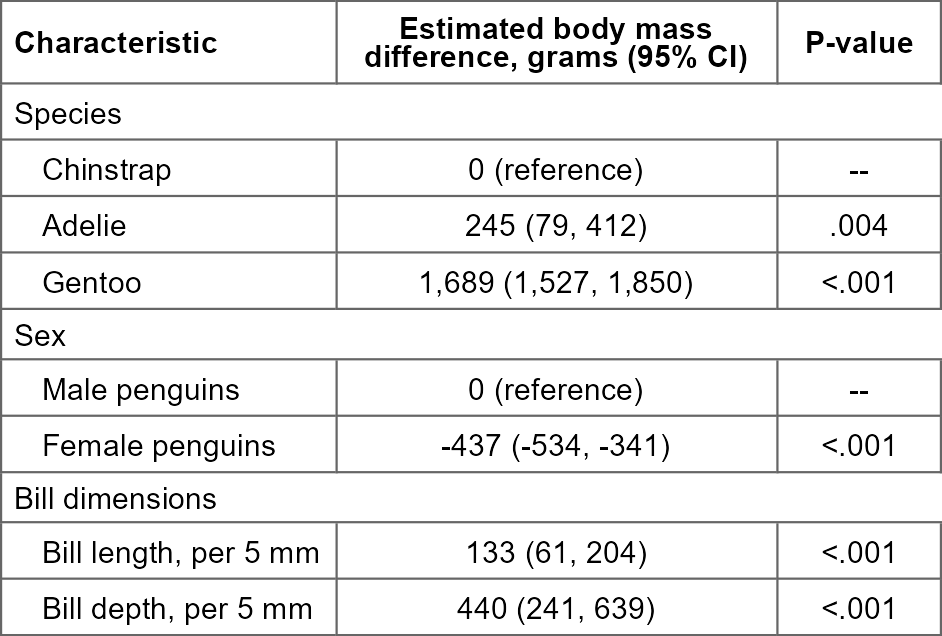
Ordering rows directly with index_rows()
index_terms() is a convenience wrapper around index_rows() for model output specifically. You can use index_rows() directly on any table that has columns identifying a variable name and (for nominal variables) a category value — for instance, a summary table you built by hand. The name/category columns can hold the dictionary’s raw names and levels, their labels, or a mix of both, so this works even on tables that have already been translated for a report:
peng_summary <- tibble(
  name  = c("species", "species", "species", "sex", "sex"),
  level = c("Gentoo", "Chinstrap", "Adelie", "Male penguins", "Female penguins"),
  n     = c(124, 68, 152, 168, 165)
)

peng_summary %>%
  index_rows(dictionary = dd_peng)
#> # A tibble: 5 × 3
#>   name    level               n
#>   <chr>   <chr>           <dbl>
#> 1 species Chinstrap          68
#> 2 species Adelie            152
#> 3 species Gentoo            124
#> 4 sex     Male penguins     168
#> 5 sex     Female penguins   165
Notice that species sorts before sex (matching set_variable_order()), "Chinstrap" sorts first within species (matching set_category_order()), and the sex rows are correctly ordered even though they’re identified by label ("Male penguins"/"Female penguins") rather than the raw level ("male"/"female"). Any row whose name or level doesn’t match the dictionary is left untouched at its original position rather than being reordered.